
AI Images
Generate images or edit with owned image references. Supported ratios and reference limits depend on the selected model, with up to eight reference images.
- GPT Image 2.5
- Nano Banana 2.1
- Seedream 5.0 Pro
- Model-specific ratios and references
Create AI videos, images, voiceovers and music from Claude, ChatGPT, Cursor or any MCP client.
Cut AI MCP URL · Streamable HTTP
https://cutai.ai/api/mcpNote: cutai.ai and cutai.ai are separate websites; accounts and credits are not shared.
The Cut AI MCP is the Cut AI MCP on cutai.ai. It lets Claude, ChatGPT, Cursor, VS Code and Claude Code create images, videos, voiceovers, music and Cut AI Studio films in your Cut AI account. The Cut AI MCP URL is https://cutai.ai/api/mcp. There is no API key: you sign in with your Cut AI account (OAuth), and credits are used only after you approve the cost. It uses the Model Context Protocol, an open standard for connecting AI applications to external systems.
“MCP (Model Context Protocol) is an open-source standard for connecting AI applications to external systems.”
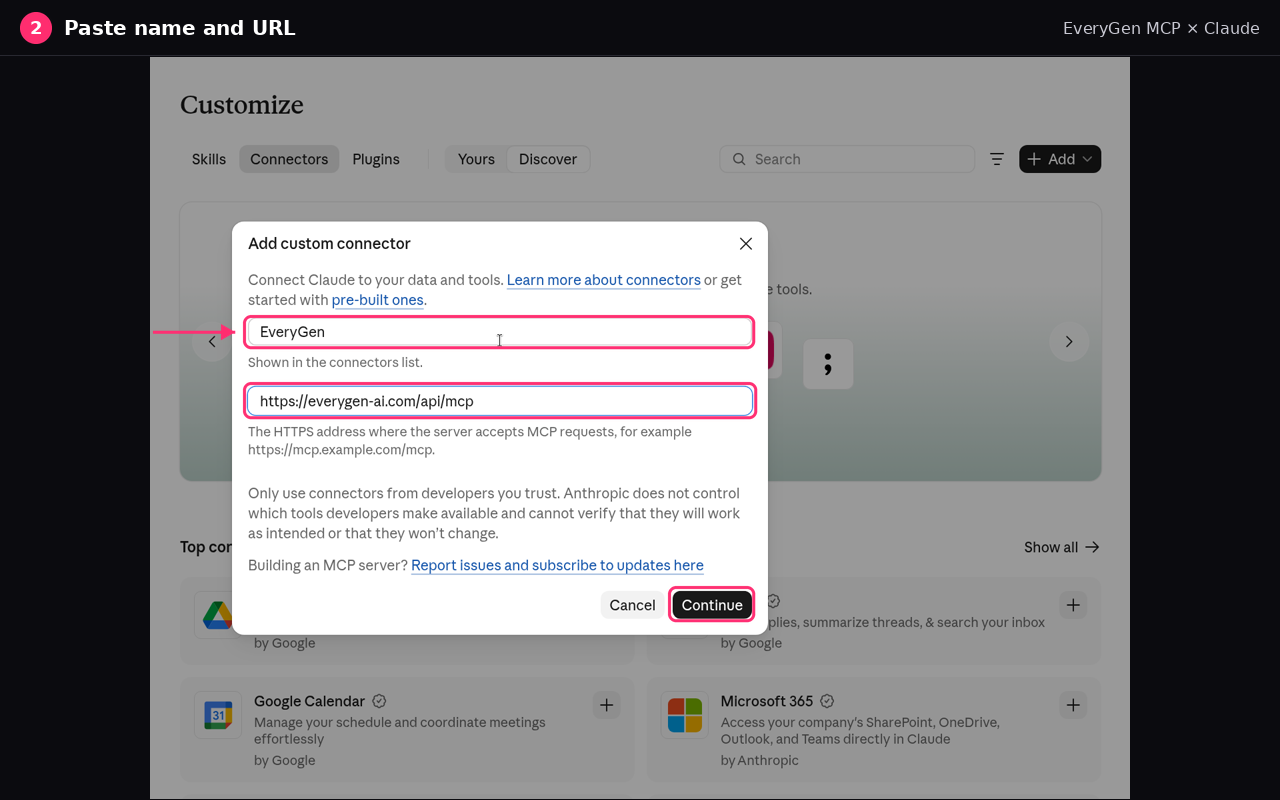
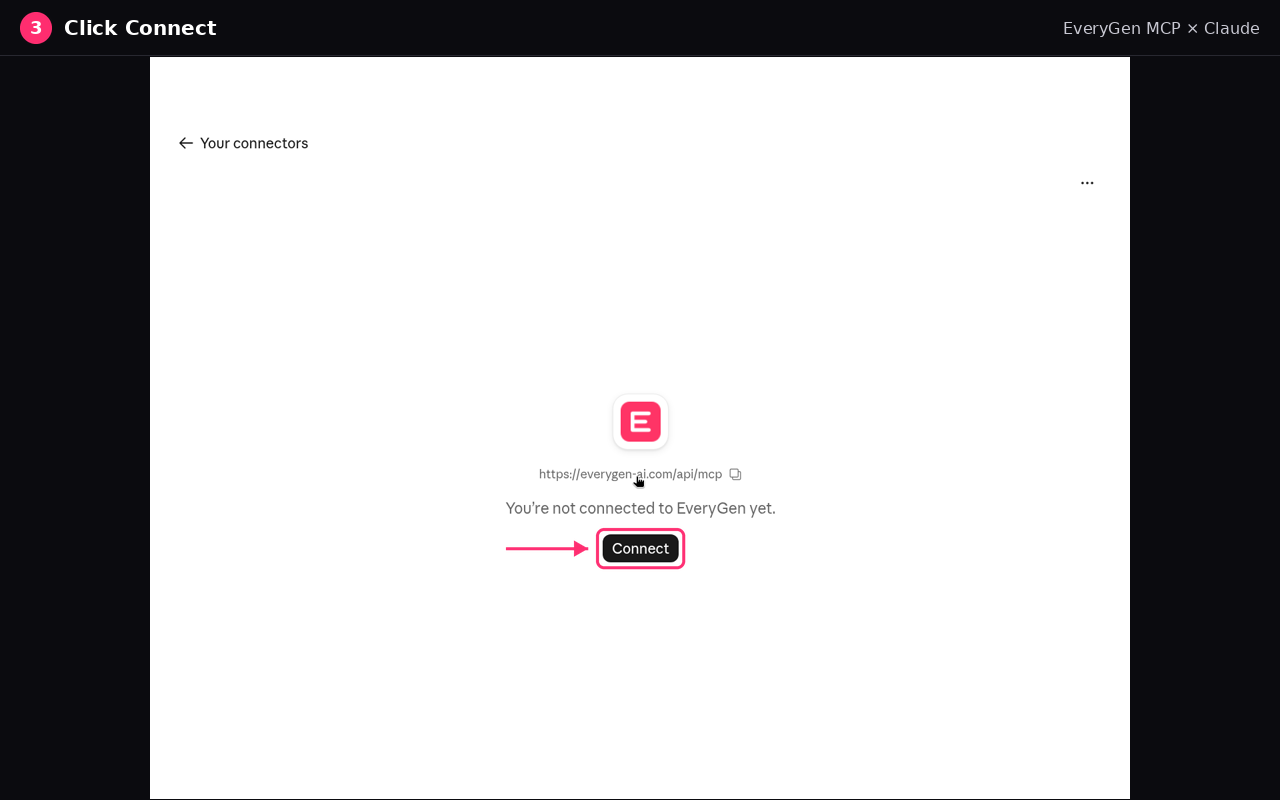
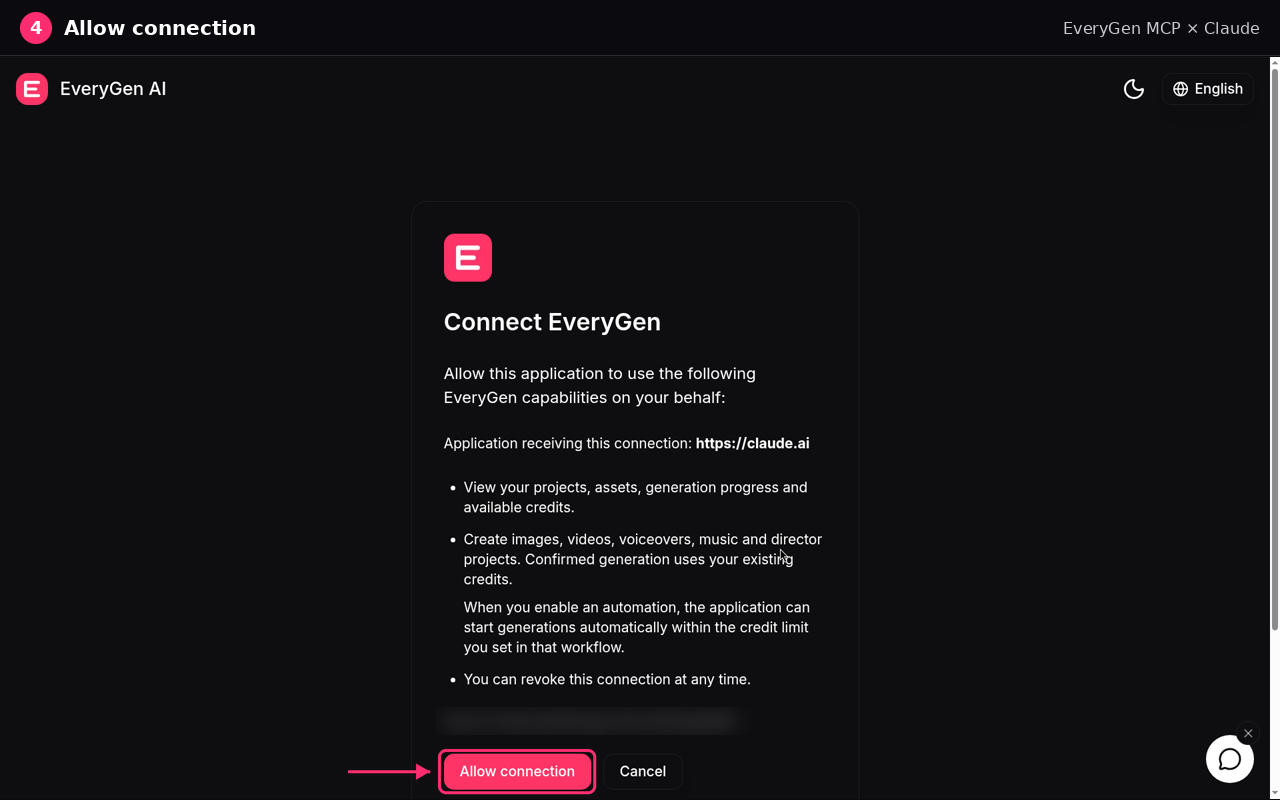
Add the Cut AI MCP in Claude as a custom connector, then sign in with your Cut AI account. On Team and Enterprise plans, an Owner adds the connector under Organization settings first.
These steps follow Anthropic's guide: Get started with custom connectors using remote MCP
https://cutai.ai/api/mcp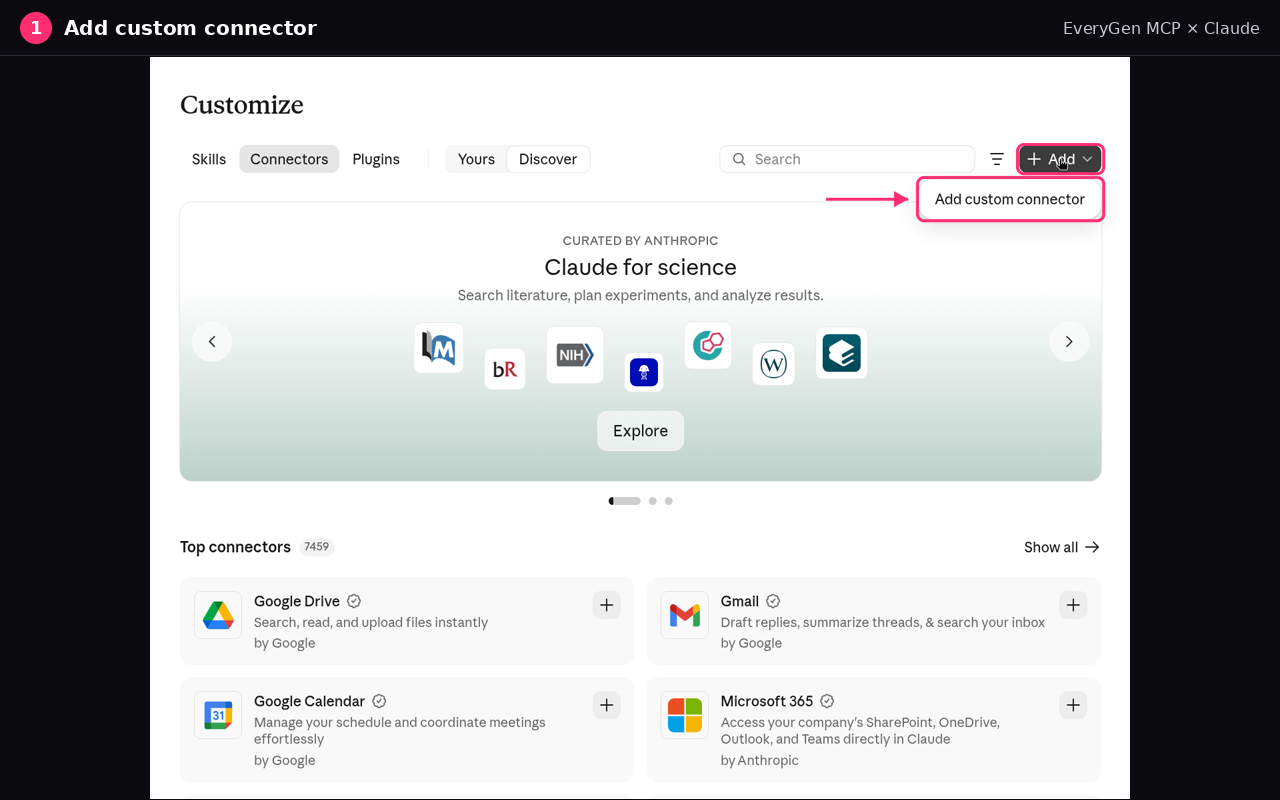
claude mcp add --transport http cutai https://cutai.ai/api/mcpAdd the Cut AI MCP in ChatGPT as a custom MCP server, then sign in with your Cut AI account.
These steps follow OpenAI's guide: Add custom MCP server
https://cutai.ai/api/mcpCursor and VS Code use the same Cut AI MCP URL. Pick the app you use and paste its config.
These steps follow the Cursor and VS Code guides: Model Context Protocol (MCP) | Cursor Docs · Add MCP servers in VS Code
{
  "mcpServers": {
    "cutai": {
      "url": "https://cutai.ai/api/mcp"
    }
  }
}{
"servers": {
"cutai": {
"type": "http",
"url": "https://cutai.ai/api/mcp"
}
}
}Agents that can edit their own MCP configuration can connect themselves. Paste this:
Add the Cut AI MCP server to this client: Streamable HTTP transport, URL https://cutai.ai/api/mcp, OAuth sign-in (no API key or headers). Then call the cutai_get_capabilities tool to verify the connection.References
The connection steps on this page follow these guides.
“Model Context Protocol (MCP) is an open protocol that enables seamless integration between LLM applications and external data sources and tools.”
Defines MCP as an open standard for connecting AI applications to external systems.
The protocol specification for the version current on this page's quotation.
How to add a custom connector with a remote MCP server URL in Claude.
How to add a custom MCP server in ChatGPT and choose OAuth.
How Cursor connects to a remote MCP server with an HTTP URL.
How to add an MCP server in VS Code and verify a tool call.
How it works
Review the creation brief and pricing, then let your assistant track the result.
Paste https://cutai.ai/api/mcp into your assistant and sign in when it asks. In ChatGPT, cutai_get_capabilities works even before you sign in.
Connect your Cut AI account with OAuth and approve read and create access. There is no API key to copy or leak.
The assistant prepares a 10-minute quote before work starts. Media quotes show the credit cost; Studio quotes explain ongoing planning and separate media costs, rather than a whole-project cap.
After you confirm, the job starts from that quote and the assistant tracks it until the media is ready. Everything is also saved in My Creations.
Capabilities
Use your Cut AI credit balance with the models currently available through MCP. Settings depend on the selected model.
Generate images or edit with owned image references. Supported ratios and reference limits depend on the selected model, with up to eight reference images.
Generate a clip from text or owned image references, with sound where supported. Choose duration, resolution and ratio from the selected model’s current options.
Narration from preset voices, with creative, natural or robust delivery. Voice cloning isn't supported.
Original tracks from a text prompt, instrumental by default or with vocals.
Multi-shot films planned and produced by Cut AI Studio, the AI video director. Start with a story plan and storyboard, answer the Director's questions, then produce or continue an existing project.
cutai_get_capabilities returns the live model IDs and each model’s ratios, durations, resolutions and reference limits. MCP availability can differ from the website catalog.
Tools
17 tools your assistant can call. Read-only tools are safe to run anytime; creation tools only run from a quote you approved.
cutai_get_capabilitiesLists the image, video, voiceover, music and Cut AI Studio options available now. In ChatGPT it works before you sign in.
cutai_get_accountShows the connected account's available credits. Read-only; it never sells credits.
cutai_get_profileIdentifies the Cut AI profile behind the current connection.
cutai_list_assetsLists your finished images, videos, music and voiceovers so they can be used as references.
cutai_import_fileCopies a file you choose in ChatGPT into your Cut AI library. No generation charge.
cutai_list_voicesFinds preset narration voices for voiceovers.
cutai_prepare_creationPrepares a 10-minute quote without generating or charging. Media quotes show the credit cost; Studio quotes describe planning and separate media pricing, not a whole-project maximum.
cutai_generate_imageStarts an image from an approved quote.
cutai_generate_videoStarts a video from an approved quote.
cutai_generate_voiceoverStarts a voiceover from an approved quote.
cutai_generate_musicStarts a music track from an approved quote.
cutai_start_directorStarts or continues an Cut AI Studio project from an approved quote.
cutai_get_taskReturns the status and finished media of an image, video, voiceover or music task.
cutai_list_projectsLists your recent Cut AI Studio projects.
cutai_get_projectShows a Director project's storyboard, open questions and current result.
cutai_respond_to_choiceSends your answer to a Director question. It resumes the same turn without buying another.
cutai_cancel_projectStops a Director project when you ask it to.
Example
What happens behind the scenes when you ask for a clip.
You
Make a 5-second vertical video of a paper boat drifting down a rainy street at dusk, with sound.
Assistant calls cutai_prepare_creation
{ "creation": { "kind": "video", "prompt": "A paper boat drifting down a rainy street at dusk", "seconds": 5, "resolution": "720p", "ratio": "9:16", "audio": true } }Cut AI returns a quote
{ "quote_id": "7c1e…", "kind": "video", "credits": 41, "expires_in_seconds": 600, "confirmation_required": true }You
Looks good, go ahead.
Assistant calls cutai_generate_video, then cutai_get_task
{ "status": "success", "credits": 41, "media": [{ "type": "video", "url": "https://…/video.mp4" }] }Illustrative example. Each actual quote supplies the current cost for the chosen model and settings.
FAQ
The Cut AI MCP, also called the Cut AI MCP, is the Model Context Protocol server from Cut AI at cutai.ai. Claude, ChatGPT, Claude Code, Cursor and VS Code use it to create images, videos, voiceovers, music and Cut AI Studio films in your Cut AI account. The Cut AI MCP URL is https://cutai.ai/api/mcp.
There are currently two websites offering an "Cut AI MCP": cutai.ai and cutai.ai. They are independent sites and credits are not interchangeable. If you bought credits on cutai.ai, follow this page to connect the MCP (https://cutai.ai/api/mcp) to Claude or ChatGPT. If you bought credits on cutai.ai, please refer to their website's own connection docs.
The Cut AI MCP URL is https://cutai.ai/api/mcp. That address is the Cut AI MCP. Paste it into Claude, ChatGPT, Cursor, VS Code or Claude Code, then sign in with your Cut AI account. There is no API key.
In ChatGPT on the web, open ChatGPT Plugins, select the plus button, then Add custom MCP server. Name it Cut AI, enter https://cutai.ai/api/mcp, choose OAuth, and select Create as a plugin. Install Cut AI, type @ in a chat, select it, and sign in with your Cut AI account. OpenAI documents this flow in its custom MCP server guide.
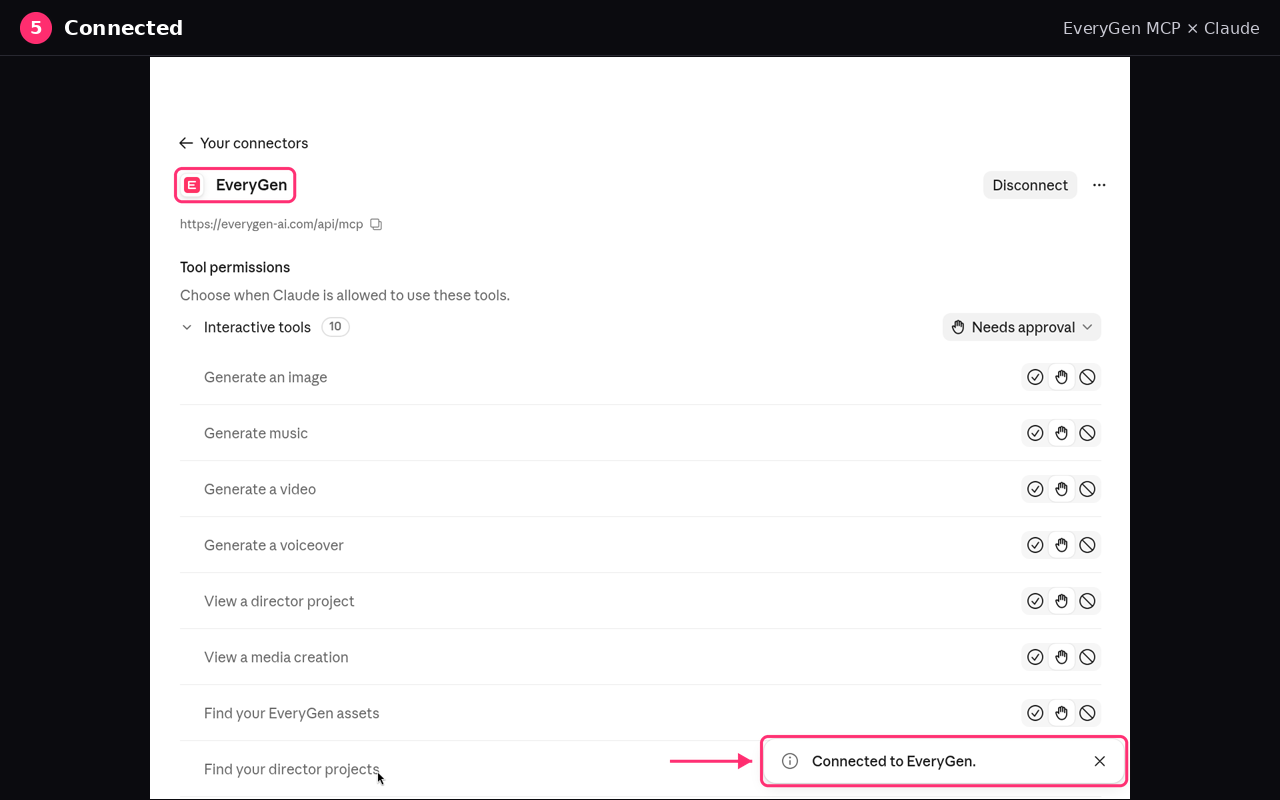
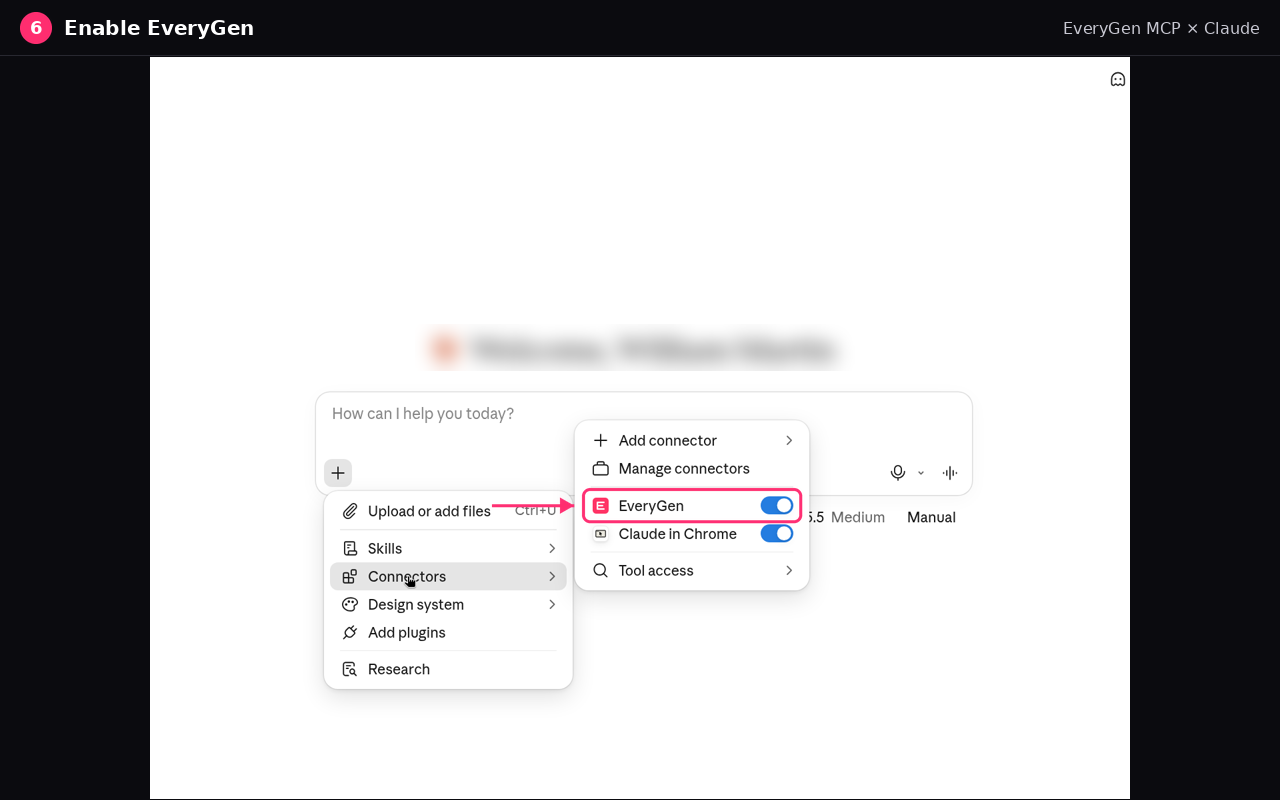
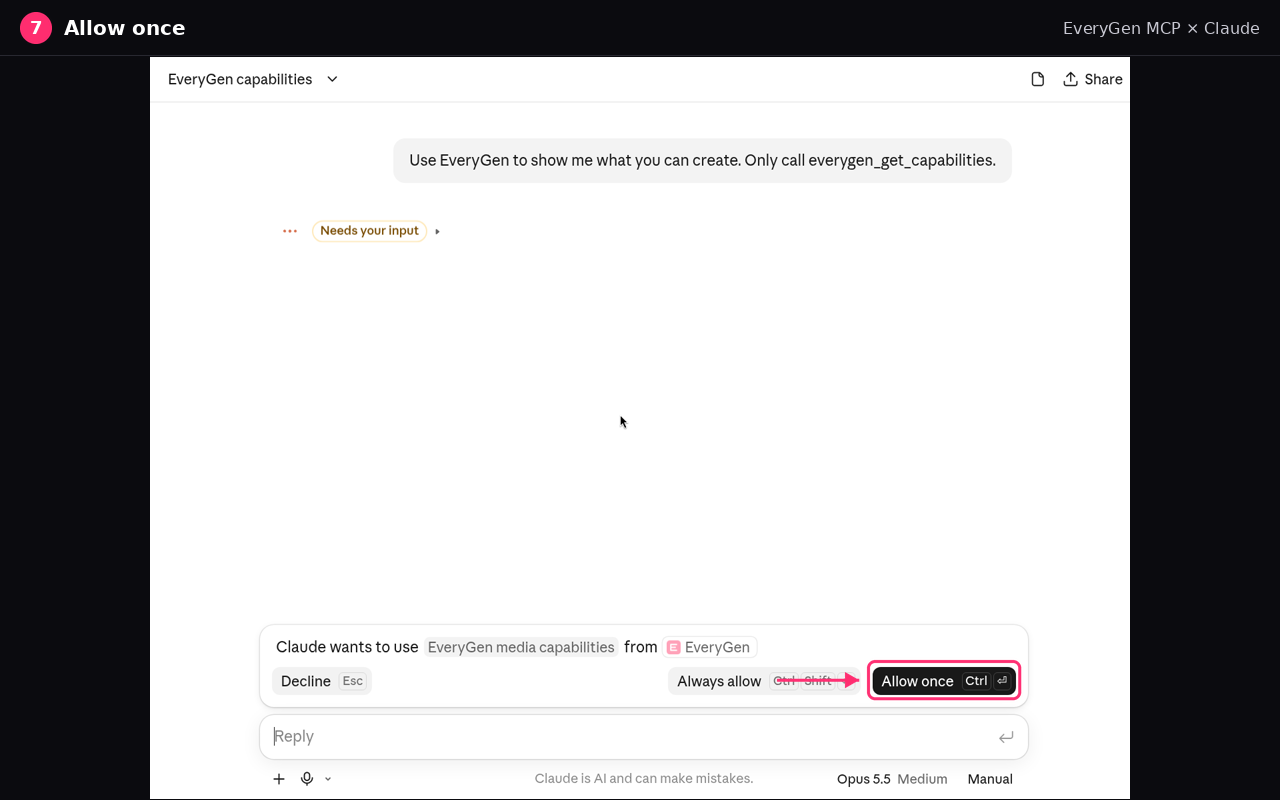
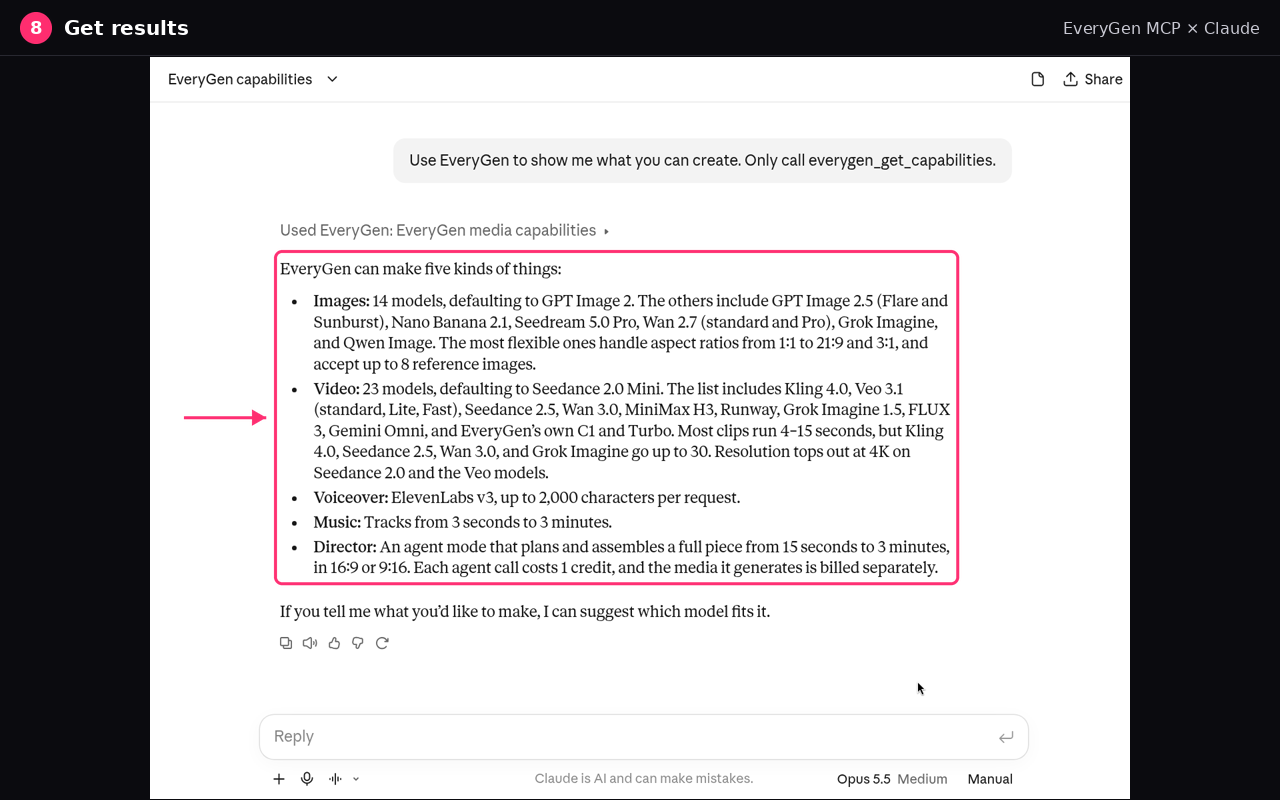
In Claude on the web or Claude Desktop, open Customize, then Connectors, and choose Add custom connector. Name it Cut AI, paste https://cutai.ai/api/mcp, select Continue, then select Add. Choose Connect, sign in with your Cut AI account if you are asked, and choose Allow connection. In a chat, open +, then Connectors, turn Cut AI on, ask for media, and choose Allow once. Claude shows the result in the chat. In Claude Code, run claude mcp add --transport http cutai https://cutai.ai/api/mcp and authenticate from /mcp.
No. Cut AI uses OAuth: you sign in with your Cut AI account and approve access. There is no API key, token or header to paste, and you can revoke the connection anytime in Settings → Connected apps.
Connecting is free and there is no separate MCP fee. In ChatGPT, checking capabilities doesn't even need an account. Generations use the same credits as the Cut AI website: the Free plan includes 10 one-time credits, and paid plans and credit packs are on the pricing page. The MCP server itself never sells credits or subscriptions.
Media quotes show the credit cost and are valid for 10 minutes. After approval, the job uses existing credits; retrying the same quote does not buy another copy. Confirmed failed operations return the affected credits, while completed work remains chargeable. Studio planning and follow-up work also use credits, separately from generated media. A Studio quote is not a whole-project spending cap.
The assistant should show the brief and pricing and obtain your approval before starting from a quote. For Studio, also review the workspace’s media cost-confirmation setting, which controls later media approvals. Only credits already in your account can be used; the MCP tools do not buy plans or credit packs.
Access tokens are short-lived and tied to your account and the Cut AI MCP server. The assistant can only see the assets, projects and credit balance of the account you connect, and uploaded files are treated as reference material, not instructions. Revoking access in Settings → Connected apps stops new requests; your projects and media stay in your account.
Any MCP client that supports remote Streamable HTTP with OAuth sign-in, including ChatGPT, Claude on the web and desktop, Claude Code, Cursor and VS Code. Clients that support MCP Apps, such as ChatGPT, also show an interactive Cut AI card with the quote, a confirm button and media previews.
Ask your assistant to call cutai_get_capabilities. It returns current image and video model IDs, supported ratios, durations, resolutions and reference limits, plus voiceover, music and Studio availability. Choose from those returned options rather than assuming every website model or setting is exposed through MCP.
Yes. The assistant can find your owned assets or import a ChatGPT file you choose to send to Cut AI, then use its asset ID as a reference. For Studio, it can retrieve the saved project, answer a pending Director question and prepare a new revision with the same project ID. If a request is pending or the connection drops, check the original task or project before submitting another creation.
Copy the server URL, sign in once, and create videos, images, voiceovers and music wherever you already work.
https://cutai.ai/api/mcp